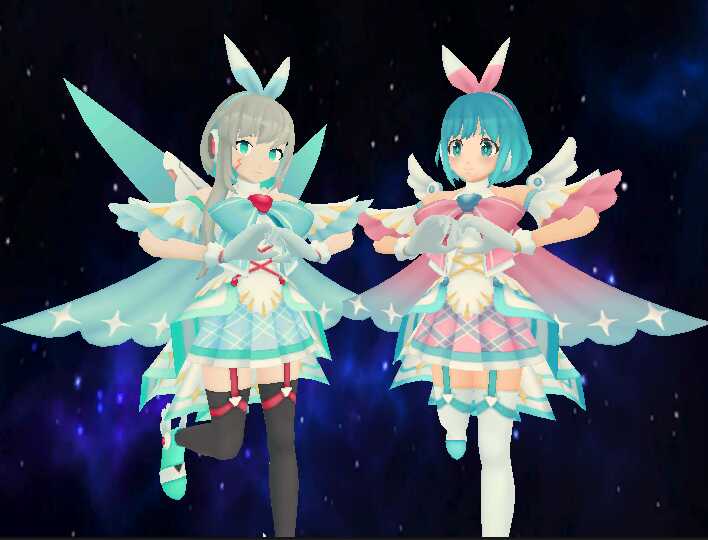
Valentine's Day Ico And RiCo
Back to full item page
#1
A quick check that you are a person keeps downloads free. Once it is done, the download button unlocks.
5 of 5 free downloads left today.
Sign up to get 100 downloads per day for free.
Want more like this?
Sign in to follow and get alerts
All downloads
2 files for this item
ago
Updated ago
File: 10651
Size: 13.8 MB
Type: unitypackage
Avatar
PC Poor
Quest No
34.2k Polygons
19 Materials
170 Bones
72 Blendshapes
25 PhysBones
5.9 MB Textures
SDK
VRChat SDK3 Avatar
Avatar setup
Avatar Descriptor
Lip Sync (Visemes)
Expression Menu
Eye Tracking
Full Body Ready
Menu Toggles
Blinking (Blendshapes)
Station / Seat
Expression Parameters
Locomotion Layer
Custom Locomotion
Viewpoint set
Rig & mesh
Humanoid Rig
Viseme Blendshapes
Facial Blendshapes
Blendshapes
Dynamics
PhysBones
PhysBone Colliders
Unity Constraints
Physics Colliders
Content
GoGo Loco
Animation Clips
Custom Shaders
Prefabs
Animator Controllers
Scenes
Realtime Lights
Textures
Shaders
Poiyomi
Cubed's
Unity Standard
Platform
PC Only
Why it is not Quest compatible
- PhysBone components: 25 exceeds the mobile hard cap of 8
- Polygons: 34,183 exceeds the 20,000 mobile limit
- Uses PC-only shaders; Quest requires VRChat/Mobile shaders
- Realtime lights are removed on Quest
PC rank is limited by
- Material slots: 19 (Poor)
- PhysBone components: 25 (Poor)
- Realtime lights: 1 (Poor)
- Bones: 170 (Medium)
- Animators: 2 (Good)
Avatars in this package
Valentine's Day Ico And RiCo
Poor
GoAvatrCoat
Good
GoAvatr
Good
Models
Valentine's Day RiCo.fbx
Valentine's Day Ico.fbx
GoAvatrCoat.fbx
GoAvatr.fbx
Shaders used
Hidden/Locked/.poiyomi/Poiyomi 8.0/Poiyomi Toon/d3695d7b3cdb1054fa68d828f01604e4
Hidden/Locked/.poiyomi/Poiyomi 8.0/Poiyomi Toon/d904b2ab1a65c2949906b87b1a9aa83f
Standard
Measured automatically from the uploaded package. Performance ranks are an estimate of VRChat's own rating.
How to install
- Install the VRChat Creator Companion and create an avatar project. It picks the Unity version VRChat supports.
- Make sure the VRChat Avatars SDK is added to the project in the Creator Companion.
- Open the project in Unity and import the .unitypackage with Assets, Import Package, Custom Package.
- Open the included scene or drag the avatar prefab into your scene.
- Open VRChat SDK, Show Control Panel, sign in, then use Build & Test or upload.